
Let's Review | Study1.1.4 - Get APK
You'll be able to download in few seconds.
Publisher Description
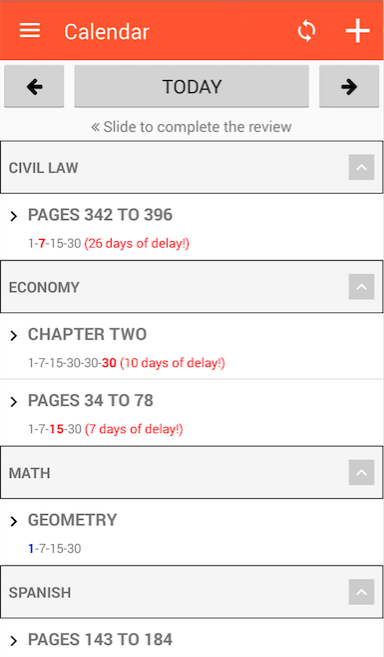
The Let's Review is an application that manages, quickly and easily, scheduling revisions, based on studies on the "Curve of Forgetting", performed by the German psychologist Hermann Ebbinghaus.
"But what is this such a Forgetting Curve?". Well, the study of human memory Ebbinghaus describes that soon after the first hours of learning, our content retention capacity undergoes an exponential loss. In their experiments, the psychologist noted that immediately within 24 hours of learning can forget 50% to 80% of the information! In a period of 30 days, the percentage drops to about 2%!
According to Ebbinghaus, repetition is a decisive and essential factor for greater retention of what we learn. Periodic reviews (made every 24 hours, 7 days, 15 days and 1 month after the schedule) are responsible for establishing more and more content, converting it into knowledge.
The idea, then, is to carry out cyclic review, reminding content in increasingly spaced times, again for 100% of the learning curve. This is where the Let's Review join by automating this cycle and facilitating the reviews. :)
Doubts? Problems? Suggestions? Send us an email! partiurfb@gmail.com
Like to study? Visit our Instagram! @partiurfb
About Let's Review | Study
The company that develops Let's Review | Study is PartiuRFB. The latest version released by its developer is 1.1.4.
To install Let's Review | Study on your Android device, just click the green Continue To App button above to start the installation process. The app is listed on our website since 2017-01-04 and was downloaded 0 times. We have already checked if the download link is safe, however for your own protection we recommend that you scan the downloaded app with your antivirus. Your antivirus may detect the Let's Review | Study as malware as malware if the download link to info.andersonsoares.partiurevisar is broken.
How to install Let's Review | Study on your Android device:
- Click on the Continue To App button on our website. This will redirect you to Google Play.
- Once the Let's Review | Study is shown in the Google Play listing of your Android device, you can start its download and installation. Tap on the Install button located below the search bar and to the right of the app icon.
- A pop-up window with the permissions required by Let's Review | Study will be shown. Click on Accept to continue the process.
- Let's Review | Study will be downloaded onto your device, displaying a progress. Once the download completes, the installation will start and you'll get a notification after the installation is finished.
Program Details
System requirements
Download information
Pricing
Version History
version 1.1.4
posted on 2017-01-04
VERSION 1.1.4 BUILD 60,Fixed some bugs
version 1.1.2
posted on 2015-10-18
VERSION 1.1.2 BUILD 58,- Fixbugs,- Added backup data to the cloud,- Frequencies personalization,- Calendar
Disclaimer
External Download
We do not host Let's Review | Study on our servers. We did not scan it for viruses, adware, spyware or other type of malware. This app is hosted by Galad and passed their terms and conditions to be listed there. We recommend caution when installing it.
The APK Download link for Let's Review | Study is provided to you by apps112.com without any warranties, representations or guarantees of any kind, so access it at your own risk.
If you have questions regarding this particular app contact the publisher directly. For questions about the functionalities of apps112.com contact us.
